
















What Is Master Blender, Really?
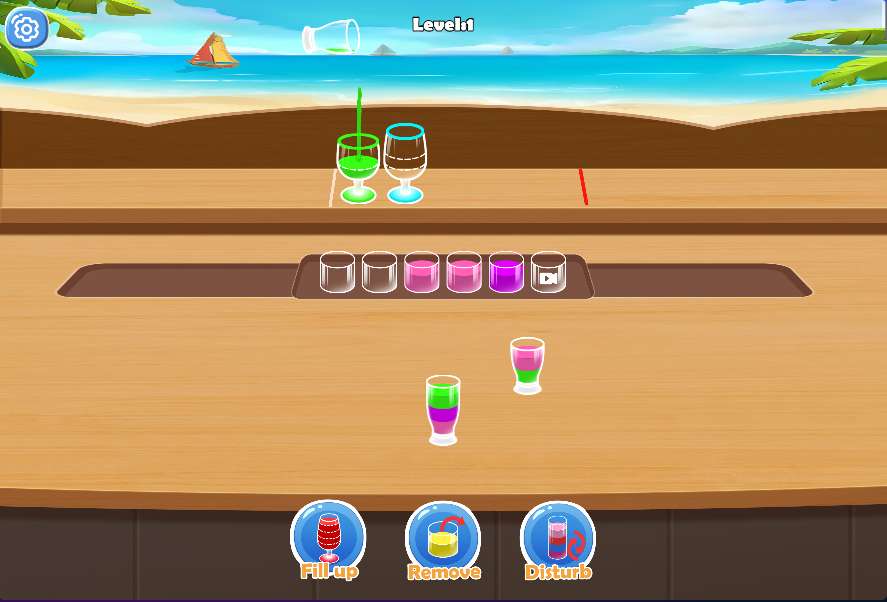
At first glance, Master Blender looks like one of those zen pouring games where you just tap and watch water flow. And that's partly true. But there's a quiet logic puzzle hiding under the calm visuals. Each level gives you a set of bottles filled with colored water, and a row of empty cups. Your job is to tap each bottle to pour its contents into the matching cup. Sounds easy? The catch is that bottles often hold mixed layers of color, and you can only pour one layer at a time. You'll need to figure out the right order to avoid blocking yourself.
It's the kind of game that feels meditative until you realize you've been staring at the same bottle for two minutes, trying to remember which cup you already filled.
How Pouring Works (and Why You'll Mess It Up at First)
You tap a bottle to pour its top layer of liquid into the cup directly below it. You can only pour if the cup is empty or if the top layer matches the color already in the cup. That's it. But because bottles can have multiple colors stacked in them, you sometimes need to pour a color into a temporary bottle (if one is available) to access the layer you actually want.
New players often pour too quickly and end up with a cup that has two different colors mixed together — and that's a dead end. Once a cup gets a mismatched layer, you can't undo it. So patience matters more than speed here.

Common Beginner Mistakes
- Pouring without checking the full stack. Always look at what's under the top layer before you tap. If you pour away a color you needed later, you might have to restart.
- Ignoring the extra bottles. Some levels give you empty bottles. Use them as temporary holding spots. They're not just decoration.
- Filling a cup too early. Just because a cup matches the top layer doesn't mean you should pour. Sometimes it's smarter to leave the cup empty so you can use it as a staging area.
A Few Practical Tips That Actually Help
If you get stuck, try working backward. Look at the bottom layer of each bottle and figure out which cup it needs to go into. Then ask yourself: what needs to be cleared out first to reach that layer? This reverse thinking saves a lot of tapping.
Also, don't be afraid to restart. Levels are short, and restarting is faster than trying to dig yourself out of a messy pour. The game doesn't punish you for it.
One thing I noticed after playing for a while: the difficulty curve isn't perfectly smooth. Some early levels are deceptively tricky, while later ones sometimes feel easier because they give you more tools. That irregular pacing can be a little frustrating if you're expecting a steady climb, but it also keeps you on your toes.
Who Is This Game For?
Master Blender works best if you enjoy low-stakes puzzles that don't demand fast reflexes. It's a good fit for playing while listening to a podcast or winding down before bed. If you're someone who likes pure logic puzzles with no timers and no pressure, this will click. But if you need constant action or high difficulty, you might find it a bit too relaxed after the first few levels. The game does repeat its core idea a lot — it's always about sorting colored layers — so whether that feels soothing or repetitive depends on your mood.